

Planned improvements are complete
Experience the New Updates
We have improved our systems to provide a unique digital banking profile for every member, more services for joint accountholders and enhanced fraud detection. Thank you for your patience while we implemented these major system updates. Our branch and service center teams are available and excited to serve you better!
In July, you’ll also start receiving updated statements.
Visite ésta página en español


Digital banking account FAQs
How do I set up a new login as a joint accountholder?
- Go to macu.com or open the app.
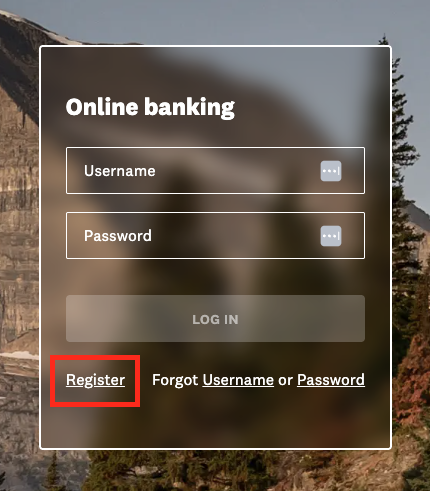
- Below the login area, select Register (desktop) or Register a New Account (mobile).
- Follow the steps.
Have your account number and Social Security number ready.
How do I unhide account numbers?
- Log in to online banking or the app.
- From the dashboard or the Accounts page, click the share (checking or savings account) or loan.
- Select Account Details or Show Details.
- Click the eye icon next to the account number or MICR to unmask (or re-mask) the number.
How do I change my account nickname?
- Log in to online banking or the app.
- Navigate to Accounts.
- Select the account you’d like to rename.
- Click the pencil icon next to the name.
- Enter a new nickname (and color if desired).
- Click Save.
How do I change the order of accounts on my dashboard?
- Log in to online banking (this option is not available in the app).
- Navigate to Settings.
- Select Accounts.
- Click Reorder Accounts.
- Drag and drop the accounts to the desired order.
Note: They can only be rearranged within each category—for example, checking and savings can be reordered within the shares section.
How do I remove a joint user from my account?
Shares
- All account owners must sign a Deletion of Joint Owner form. You can start this process at any branch or by calling the service center.
- If the form is not signed in front of a Mountain America team member, you must use DocuSign or have the form notarized to be accepted.
- Return the signed form within 30 days of starting the process. Otherwise, the process must be restarted.
- All shares for every account owner must have positive balances (no negative or charged-off shares). If the account owner is a beneficial owner on a negative business account, removal is not allowed.
Loans
The loan must be refinanced to remove a co-borrower.
Unique profiles for joint accountholders
Register for digital banking today
If you are a joint user, you should register now for your own digital banking profile, which will ensure you have continued access to all your accounts. Creating your profile will also provide advanced fraud detection, account customization and access to the digital banking services listed below.
Account AlertsMonitor your accounts 24/7 by creating customized text, email and push notifications.
See full card details, lock and unlock your card, request a replacement, update your PIN and set travel notices.
View your credit score, see credit alerts and explore how financial choices could change your score.
Manually pay bills or schedule automatic, recurring payments to save time.
Deposit checks by simply taking a photo with your phone.
Easily lock and unlock your Experian credit report.
Monitor your property value, view available equity and get personalized home financing recommendations.
View your statement directly inside digital banking.


What has changed on my personal account?
Consolidated member profiles
Now your digital banking profile will display all Mountain America accounts connected to your SSN or TIN. Please note that anyone sharing your login credentials can view and access all accounts on your new consolidated profile.
For your privacy and security, please do not share your username and/or password with anyone else.
How to log in
Use the same username and password as you did before the updates. If you had multiple logins, use the one associated with your most active and frequently used account.
If you have trouble logging in, please reset your credentials with the Forgot Username and Password feature on macu.com or in the app. For further assistance, please call our service center at 1-800-748-4302.
Post-update checklist
When you log in, please verify the following on your account:- Mailing and email addresses
- Scheduled payments for bill pay
- Account alerts
- Travel notices


New account statements
Watch for an updated design
Beginning in July, statements will have a new look. We’re also adding credit card transactions to the general statement, so credit card users will no longer receive two statements. We've included a sample here so you'll know what to expect.Paper statement fees
Don’t forget—if you are signed up to receive paper statements, there is a $2 monthly fee. To receive your statements faster and more securely (and avoid the fee), we recommend enrolling in eStatements.One member, one login
Now that our system updates are complete, you'll enjoy these key benefits:
- Customized profiles—Every member can tailor their profile to their preferences. Create account alerts, set up your own bill pay payees and view your credit score as often as you like.
- Advanced fraud detection—With only one person per login, our systems can more accurately utilize behavioral biometrics to detect unauthorized users and transactions.
- Consolidated account view—Members with multiple Mountain America accounts can access them all on the same profile with one login.


Bill pay and Zelle® updates
For members with one account loginPayments and payees for primary accountholders remain the same. Joint users should register now for a separate digital banking profile, which will offer bill pay and Zelle® customization, enhanced security and more digital banking services.
For members who previously had multiple account loginsWith your newly consolidated member profile, your bill pay payees have carried over from all your accounts, and scheduled payments and payment history have carried over from your most active account. Your Zelle® payment history was also transferred from your most active account. To view any payments that did not carry over, please go to that account's transaction history.
Please take a moment to log in to your account and set up any scheduled payments and payees that did not transfer to your consolidated profile.Frequently asked questions
Did my account numbers or login credentials change?
How did the updates affect my account nicknames?
How did the updates affect my rewards points?
All your rewards points have carried over, and MyStyle Checking and Rewards credit card points earned on the same member account continue to be combined. Points from different member accounts will not be combined.
To access your rewards points, log in to digital banking and choose Accounts > My Rewards. Then select the account you want to view from the pop-up menu.
Will joint accountholders still be able to earn and use rewards points when they set up their own digital banking profile?
Did scheduled travel notices transfer to my updated digital banking profile?
- No, previously scheduled travel notices will not show up in your digital banking profile after June 1. However, Visa will still have them on record, which will reduce interruptions from fraud alerts/holds when you travel. If you'd like to see them in digital banking, you'll need to add them again using card manager.
- All travel notices scheduled after June 1 will remain on your profile.
What has changed on my business account?
Business essential and nonprofit checking—In the past, fee-based services were paid in a lump sum at the end of the month. Now these services are charged and processed as transactions occur. Costs for transactions will remain the same, and you will continue to receive your statement on the first day of the month.
Business growth checking—You will now be billed between the 10th and 15th days of the month instead of between the 1st and 5th of the month. We have also improved the format of your monthly statement to make it easier for you to find essential information.
Business essential checking with cash management—If you had business essential checking with cash management services before the updates, your account has been automatically upgraded to a business growth checking account as of June 1. You will receive your bill between the 10th and 15th day of the month, and the monthly maintenance fee has been waived for your account.
Sole proprietorships—All accounts linked to your Social Security number (SSN) or taxpayer identification number (TIN)—including personal and business accounts—have been combined into one digital banking profile. Enter the username and password for your sole proprietorship account to view your new consolidated profile. Please note that anyone sharing your login credentials has access to all accounts tied to your SSN. For your privacy and security, please do not share your username or password, and encourage any joint users on your account to register for their own, unique digital banking profile for increased security, account customization and access to more services.
If you have any questions, please call the business services team at 801-325-6504, option 4.
Learn how to protect your account
See the strategies we use to keep your data secure and get tips to guard your personal information and finances.

Protect yourself online
Follow these tips to take preventative measures and keep your data secure.


Learn phishing red flags
Understanding the warning signs of a scam can protect you.
*U.S. checking or savings account required to use Zelle®, and account must be in good standing for 90 days.
Zelle® and the Zelle® related marks are wholly owned by Early Warning Services, LLC and are used herein under license.
